
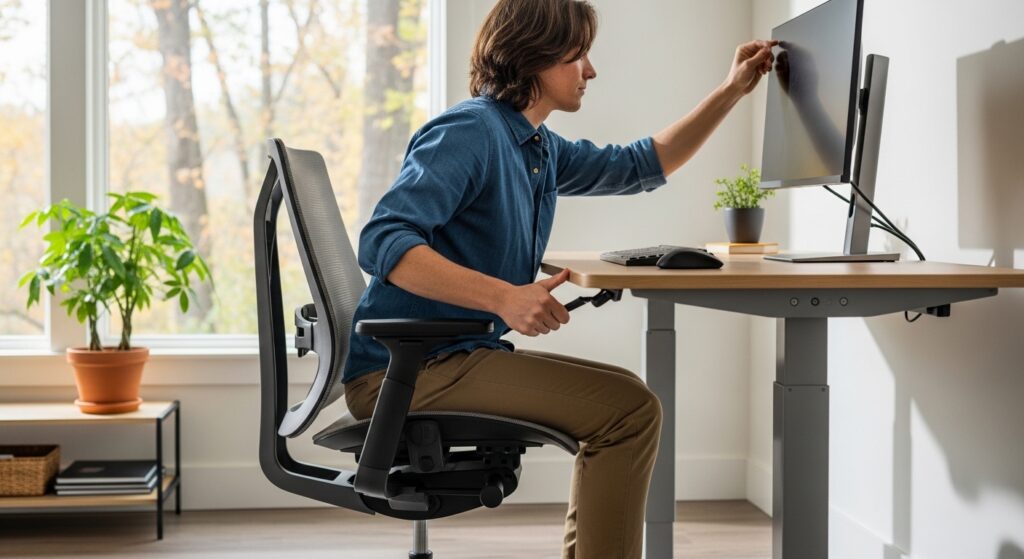
Workplace ergonomics focuses on designing tasks, equipment, and workspaces to fit the needs of the body. When a workstation supports proper posture and movement, it may help reduce physical stress and lower the risk of long-term injuries. Many people think of workplace injuries as sudden accidents, but a large number of injuries develop slowly through repetitive strain, poor posture, and repeated overuse. These issues may affect office workers, warehouse staff, healthcare employees, drivers, and many others across different industries.
Long-term workplace injuries often begin with small warning signs. A stiff neck after work, tingling in the hands, lower back soreness, shoulder tension, or recurring wrist pain may seem minor at first. Over time, however, these symptoms may grow more serious and start interfering with job performance, sleep, and daily life. That is why ergonomic awareness matters. It may help workers identify risk factors early and make practical changes before discomfort turns into a more serious condition.
If you have read our post on Workplace Injuries: What Every Employee Needs to Know, you already know that injuries can happen in nearly any work setting. Ergonomics adds another layer to that discussion by focusing on prevention. It looks at how people sit, stand, lift, reach, type, twist, and repeat motions throughout the workday. Even small improvements may make a meaningful difference over time.
Why Ergonomics Matters in Everyday Work
 Ergonomics is the science of fitting the job to the worker rather than forcing the worker to fit the job. In a practical sense, that means adjusting equipment, layout, and movement patterns so the body works in a more natural and balanced way. The goal is not just comfort. The goal is to reduce unnecessary strain on muscles, joints, tendons, ligaments, and nerves.
According to the National Institute for Occupational Safety and Health, ergonomic risk factors may include repetitive motion, forceful exertion, awkward posture, contact stress, vibration, and long periods in one position. These issues may contribute to musculoskeletal disorders that affect the neck, shoulders, back, arms, wrists, hips, knees, and feet. In many cases, these injuries do not happen from one dramatic event. They build gradually through routine work activities.
This is one reason long-term injuries are easy to overlook. A worker may think the soreness is temporary or simply part of the job. But repeated stress without enough recovery may eventually lead to chronic pain, reduced mobility, missed work, and expensive medical care. As discussed in The Hidden Costs of an Injury: What Most People Overlook, the impact of an injury often goes beyond the immediate physical pain and may affect finances, emotional well-being, and quality of life.
Common Long-Term Injuries Linked to Poor Ergonomics
Workplace ergonomics may help reduce the risk of several common injuries that develop over time. These injuries may affect workers in offices, retail spaces, construction sites, hospitals, warehouses, and home-based work environments.
Back And Neck Pain
Sitting for long periods without proper lumbar support may place extra pressure on the spine. Poor monitor height, leaning forward, or cradling a phone between the shoulder and ear may also create tension in the neck and upper back. Workers who lift, bend, or twist repeatedly may also develop back strain if body mechanics are poor.
Carpal Tunnel Syndrome
Typing, clicking, scanning, gripping tools, or performing repeated hand motions may irritate the median nerve in the wrist. Over time, this may lead to numbness, tingling, weakness, and pain in the hands and fingers.
Tendonitis And Repetitive Strain Injuries
Repeated movement without enough rest may inflame tendons in the shoulders, elbows, wrists, or knees. These injuries are often seen in jobs that involve constant reaching, lifting, keyboard use, assembly work, or patient handling.
Shoulder Strain
Working with the arms raised too high, reaching across the body often, or using poorly positioned tools may strain the shoulders and upper arms. Poor workstation setup may make this worse over time.
Some of these injuries overlap with the issues covered in Top 7 Most Common Injuries and How to Protect Yourself, especially back injuries, sprains, and strains. The difference is that ergonomic injuries often build slowly and may be preventable with better daily habits and workstation design.
Office Ergonomics and Desk Setup
Office environments may appear low risk compared to construction zones or industrial workplaces, but desk jobs come with their own set of concerns. Sitting for hours, looking at screens, and using a keyboard and mouse all day may create stress on the body when the setup is poor.
Chair Position
Your chair should support the natural curve of your lower back. Ideally, your feet should rest flat on the floor or on a footrest, and your knees should be close to hip level. A chair that is too high or too low may change your posture and increase strain on the back and legs.
Monitor Height
The top of the screen should usually be at or slightly below eye level. If the monitor is too low, you may bend your neck downward for long periods. If it is too high, you may tilt your head back and strain your neck.
Keyboard And Mouse Placement
Your keyboard and mouse should be close enough that your elbows stay near your sides. Wrists should remain in a neutral position rather than bent upward or downward. The Occupational Safety and Health Administration provides general guidance on ergonomic risk reduction in the workplace.
Lighting And Screen Glare
Bright glare from overhead lights or nearby windows may cause eye strain and encourage awkward posture as workers shift to see the screen better. Adjusting screen angle, lighting, or blinds may help create a more comfortable setup.
Ergonomics in Physically Demanding Jobs
 Ergonomics matters just as much in jobs that involve lifting, carrying, pushing, pulling, standing, kneeling, or repeating physical tasks. In these environments, the risk of strain may be higher because the body faces more force and repetition throughout the day.
Safe Lifting Practices
Workers should try to lift with the legs rather than the back and keep loads close to the body when possible. Twisting while lifting may increase spinal stress. Where available, carts, dollies, lift assists, or team lifting may help reduce physical strain.
Work Surface Height
Tables, counters, and packing stations that are too high or too low may force workers into awkward positions. Over time, repeated bending or reaching may cause pain in the shoulders, neck, and back.
Tool Design And Grip
Heavy or awkward tools may increase pressure on the hands, wrists, and forearms. Handles that are too small, too large, or poorly shaped may lead to fatigue and repetitive stress. The NIOSH lifting guidelines and ergonomic resources may offer useful general information for reducing overexertion risks.
The Importance of Movement and Breaks
Even the best workstation may not fully protect the body if a person stays in one position too long. Movement matters. Short breaks throughout the day may help reduce stiffness, support circulation, and give muscles time to recover. For desk workers, this may mean standing up every 30 to 60 minutes, stretching the shoulders, walking briefly, or changing position. For physical workers, it may mean rotating tasks when possible to reduce repeated strain on the same muscle groups.
The U.S. National Library of Medicine offers general posture guidance that supports healthy movement habits. Good posture is not about sitting rigidly all day. It is about maintaining alignment while also allowing the body to move regularly.
Work From Home Ergonomics
Remote work has changed the way many people perform their jobs. Kitchen chairs, couches, beds, and improvised desks may not support proper posture during long work sessions. A home setup does not need to be expensive to be more ergonomic, but it should support the same basic principles seen in a traditional office. A stable chair, screen at a reasonable height, supportive seating, and proper hand placement may all help reduce strain.
Workers using laptops for long periods may benefit from a separate keyboard and mouse or a laptop stand to raise the screen. The Mayo Clinic provides general office ergonomics tips that may also apply to many home workspaces.
Warning Signs You Should Not Ignore
Early symptoms of poor ergonomics may include numbness, burning, swelling, cramping, reduced grip strength, back tightness, recurring headaches, and discomfort that gets worse during or after work. These signs do not always mean a severe injury is present, but they should not be ignored. Repeated symptoms may point to a setup or routine that is placing too much stress on the body.
In many cases, small changes made early may help reduce worsening symptoms. That may include adjusting a chair, repositioning a monitor, taking more frequent breaks, using assistive equipment, or reviewing task design.
How Better Ergonomics May Support Injury Prevention
Better ergonomics may support injury prevention by reducing repeated strain before it develops into a bigger problem. This may also improve concentration, comfort, and work efficiency. When the body is supported properly, workers may feel less fatigued and may move through tasks with better control.
Employers and workers both play a role here. Employers may review workstation design, equipment, workflow, and training. Workers may pay attention to posture, movement, and discomfort signals from the body. A safer environment often starts with awareness and practical adjustments rather than one major change.
Conclusion
Workplace ergonomics may play a major role in preventing long-term injuries. Whether someone works at a desk, on a warehouse floor, in a clinic, or on a job site, daily movement patterns and workstation design matter. Poor posture, repetitive motion, awkward lifting, and lack of support may gradually lead to pain and lasting physical problems. With better setup, smarter movement, and more awareness, many of these risks may be reduced.
If you want to keep exploring related topics, visit our Blog page for more published articles on injury prevention, recovery, and everyday safety.